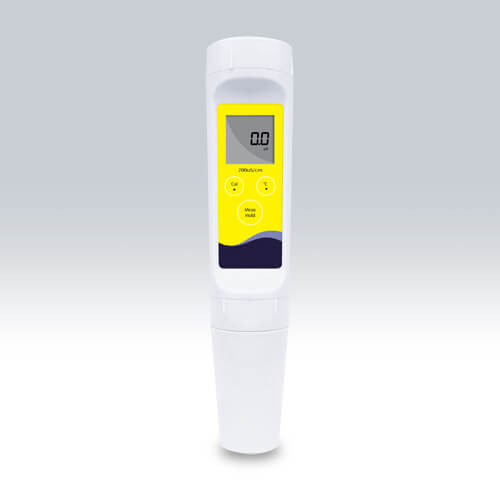
Rozwiązywanie powszechnych błędów miernika przewodności YR01807
Miernik przewodności YR01807 to wszechstronne urządzenie zaprojektowane do precyzyjnych pomiarów przewodności cieczy. Jednak, jak każde urządzenie elektroniczne, użytkownicy mogą napotkać różne błędy operacyjne. Artykuł ten zagłębia się w powszechne problemy, z jakimi można się spotkać podczas korzystania z YR01807 i przedstawia praktyczne rozwiązania, aby zapewnić płynne działanie.
Specyfikacje techniczne miernika przewodności YR01807
| Specyfikacja | Szczegóły |
|---|---|
| Model | YR01807 |
| Zakres przewodności | 0.1 do 19.99 mS/cm |
| Rozdzielczość | 0.01 mS/cm |
| Dokładność | ±1% FS |
| Punkt kalibracji | 1 punkt |
| Roztwór kalibracyjny | 12.88 mS/cm |
| Zakres temperatur | 0 do 50°C |
| Dokładność temperatury | ±1°C |
| Kompenacja temperatury | 0 do 50°C, automatyczna |
| Automatyczne wyłączanie | 8 minut po naciśnięciu ostatniego klawisza |
| Źródło zasilania | 3 baterie alkaliczne AA |
| Żywotność baterii | Około 150 godzin ciągłego użytkowania |
| Wymiary | 185 (D) × 40 (Średnica) mm |
| Waga | 100 gramów |
Powszechne błędy i kroki rozwiązywania problemów
W poniższych sekcjach przedstawiono częste objawy, które użytkownicy mogą napotkać podczas obsługi YR01807 oraz odpowiadające im kroki rozwiązywania problemów.
Urządzenie nie włącza się
Jeśli YR01807 nie włącza się, sprawdź następujące:
- Upewnij się, że baterie są prawidłowo włożone i nie są rozładowane.
- Sprawdź styki baterii pod kątem korozji.
- Spróbuj wymienić baterie na nowe.
Kod błędu E-01: Błąd pomiaru
Ten błąd może wystąpić z powodu niewłaściwej kalibracji lub pomiaru w silnie zanieczyszczonym roztworze.
- Skalibruj urządzenie ponownie, używając odpowiedniego roztworu standardowego.
- Wyczyść elektrodę, aby usunąć wszelkie pozostałości.
Niespójne odczyty
Niespójne odczyty mogą być spowodowane przez kilka czynników:
- Upewnij się, że elektroda jest czysta i prawidłowo zanurzona w roztworze.
- Sprawdź temperaturę roztworu; wahania temperatury mogą wpływać na odczyty.
- Poczekaj, aż urządzenie ustabilizuje się przez kilka sekund przed zapisaniem pomiaru.
Problemy z kalibracją
Jeśli masz problemy z kalibracją, rozważ następujące rozwiązania:
- Użyj świeżych roztworów kalibracyjnych w ich terminie ważności.
- Postępuj zgodnie z prawidłową procedurą kalibracji opisaną w instrukcji obsługi.
- Upewnij się, że roztwór kalibracyjny ma odpowiednią wartość przewodności.
Przepuszczanie wody lub uszkodzenia
Przepuszczanie wody może uszkodzić wewnętrzne komponenty urządzenia.
- Upewnij się, że urządzenie jest używane w ramach swoich specyfikacji wodoodpornych.
- Jeśli wystąpi kontakt z wodą, dokładnie osusz urządzenie przed użyciem.
- Sprawdź widoczne uszkodzenia lub zwarcia.
Tabela objaw-przyczyna-rozwiązanie
| Objaw | Możliwa przyczyna | Rozwiązanie |
|---|---|---|
| Urządzenie nie włącza się | Wyładowane baterie, nieprawidłowe umiejscowienie baterii | Wymień baterie, upewnij się o prawidłowej instalacji |
| Kod błędu E-01 | Błąd kalibracji, zanieczyszczony roztwór | Przeprowadź ponowną kalibrację, oczyść elektrodę |
| Niespójne odczyty | Brudna elektroda, wahania temperatury | Oczyść elektrodę, ustabilizuj urządzenie |
| Problemy z kalibracją | Przeterminowany roztwór kalibracyjny | Użyj świeżych roztworów, postępuj zgodnie z instrukcjami w podręczniku |
| Przepuszczanie wody | Niewłaściwe użycie w wilgotnych środowiskach | Dokładnie osusz, sprawdź uszkodzenia |
Najczęściej zadawane pytania
Co powinienem zrobić, jeśli mój YR01807 się nie włącza?
Najpierw sprawdź baterie, aby upewnić się, że są prawidłowo zainstalowane i mają ładunek. Jeśli urządzenie nadal się nie włącza, wymień baterie na nowe i sprawdź, czy na stykach nie ma oznak korozji.
Jak często powinienem kalibrować YR01807?
Kalibrację należy przeprowadzać regularnie, najlepiej przed każdym użyciem lub przynajmniej raz w tygodniu, w zależności od częstotliwości użytkowania i mierzonych roztworów.
Czy mogę używać YR01807 do wszystkich rodzajów cieczy?
YR01807 nadaje się do pomiaru przewodności różnych cieczy, ale należy unikać używania go w roztworach o wysokiej lepkości lub gęstych, ponieważ może to wpłynąć na odczyty.
Jaka jest maksymalna głębokość zanurzenia elektrody?
Elektroda może być zanurzona do oznaczonej linii na czujniku. Zanurzenie poza ten punkt może spowodować przedostanie się wody i uszkodzenie urządzenia.
Jakie czynności konserwacyjne są wymagane dla YR01807?
Regularnie czyść elektrodę po użyciu, upewnij się, że urządzenie jest przechowywane w suchym miejscu i wymieniaj baterie w razie potrzeby, aby utrzymać optymalną wydajność.
Jak interpretować odczyty z YR01807?
Odczyty są wyświetlane w mS/cm. Upewnij się, że porównujesz wyniki z standardowymi wartościami przewodności dla konkretnego płynu, który jest mierzony, aby określić jego jakość.
Podsumowanie
Rozumiejąc powszechne błędy związane z miernikiem przewodności YR01807 i wiedząc, jak skutecznie je rozwiązywać, możesz zwiększyć swoją efektywność operacyjną i dokładność. Rutynowa konserwacja i odpowiednia kalibracja są kluczowe dla zapewnienia długowieczności i niezawodności w twoich pomiarach.
Jeśli szukasz połączenia innowacji i jakości, trafiłeś we właściwe miejsce. W Kalstein oferujemy Ci luksus odkrywania naszego ekskluzywnego katalogu sprzętu laboratoryjnego. Produkujemy każde urządzenie zgodnie z najwyższymi standardami doskonałości. Nasze intuicyjne i bezproblemowe kanały zakupów online są zaprojektowane z myślą o Twojej wygodzie, zapewniając najbardziej konkurencyjne ceny. Nie wahaj się dłużej — ożywiamy naukę, czas stać się częścią naszej społeczności.