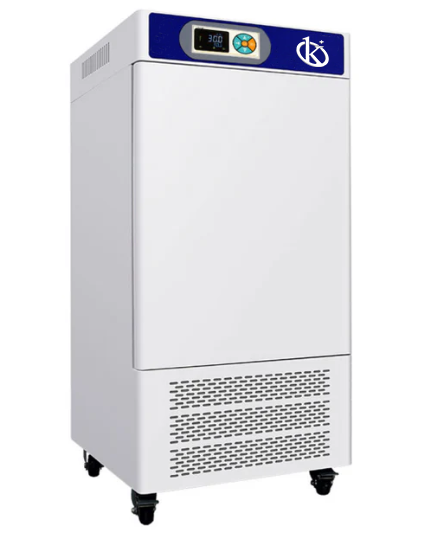
Rozwiązywanie powszechnych błędów w inkubatorze bakteryjnym YR02057
Inkubator bakteryjny YR02057 to zaawansowane urządzenie laboratoryjne zaprojektowane w celu utrzymania stałych poziomów temperatury i wilgotności dla różnych zastosowań w dziedzinie medycyny, ochrony środowiska i badań. Mimo swojej niezawodności, użytkownicy mogą od czasu do czasu napotkać błędy. Ten przewodnik ma na celu zidentyfikowanie powszechnych objawów związanych z YR02057 oraz dostarczenie szczegółowych kroków rozwiązywania problemów w celu naprawy tych problemów.
Zrozumienie inkubatora bakteryjnego YR02057
Model YR02057 wyposażony jest w mikrokomputerowy kontroler, który utrzymuje stabilne ustawienia temperatury i wilgotności. Jego wnętrze ze stali nierdzewnej zapewnia trwałość i higienę, podczas gdy wbudowany nawilżacz o dużej pojemności wspiera optymalne warunki dla wzrostu bakterii. Urządzenie jest kluczowe w badaniach, testach medycznych i monitorowaniu środowiska.
Specyfikacje techniczne YR02057
| Model | Temperatura (℃) | Dokładność (℃) | Fluktuacja (%) | Napięcie (V) | Moc (KW) | Wymiary wewnętrzne (mm) (H*W*D) | Wymiary całkowite (mm) (H*W*D) | Wymiary opakowania (mm) (H*W*D) | Waga netto (KG) | Waga wysyłkowa (KG) |
|---|---|---|---|---|---|---|---|---|---|---|
| YR02057 | 0~60 | ±0.1 | ±0.5 | 220 | 0.6 | 800×500×380 | 1350×640×660 | 1470×720×740 | 105 | 125 |
Rozwiązywanie problemów według objawów
Identyfikacja objawów problemów z YR02057 może pomóc w szybkim diagnozowaniu i rozwiązywaniu. Poniżej znajdują się powszechne problemy i ich procesy rozwiązywania.
Urządzenie nie włącza się
Jeśli Twój YR02057 nie włącza się, może to być spowodowane kilkoma czynnikami:
- Sprawdź źródło zasilania: Upewnij się, że inkubator jest prawidłowo podłączony i że gniazdko działa.
- Sprawdź przewód zasilający: Sprawdź widoczne uszkodzenia przewodu zasilającego.
- Problemy z bezpiecznikiem: Sprawdź, czy bezpiecznik wewnątrz inkubatora nie przepalił się i wymień go, jeśli to konieczne.
Kod błędu E-03
Kod błędu E-03 wskazuje na nadmierną temperaturę:
- Wentylacja: Upewnij się, że inkubator jest dobrze wentylowany i nie znajduje się w pobliżu źródeł ciepła.
- Awaria czujnika: Sprawdź czujnik temperatury pod kątem usterek lub odłączeń.
- Kalibracja: Przeprowadź kontrolę kalibracji dla dokładnych odczytów temperatury.
Nieciągłe odczyty
Nieprawidłowe odczyty temperatury lub wilgotności mogą podważyć wyniki badań:
- Warunki środowiskowe: Oceń zewnętrzne warunki wpływające na inkubator, takie jak przeciągi lub wilgotność z pobliskiego sprzętu.
- Komponenty wewnętrzne: Upewnij się, że komponenty wewnętrzne, takie jak wentylatory i grzejniki, działają prawidłowo.
- Regularna konserwacja: Zaplanuj regularne przeglądy konserwacyjne, aby wyczyścić i sprawdzić sprzęt.
Tabela objaw-przyczyna-rozwiązanie
| Objaw | Możliwa przyczyna | Rozwiązanie |
|---|---|---|
| Sprzęt nie włącza się | Problem z zasilaniem | Sprawdź gniazdko i przewód zasilający |
| Kod błędu E-03 | Wysoka temperatura | Sprawdź wentylację i czujnik |
| Nieprawidłowe odczyty | Czynniki środowiskowe | Oceń warunki i przeprowadź konserwację |
Porady dotyczące regularnej konserwacji
Utrzymanie YR02057 zapewnia jej długowieczność i niezawodność. Regularne kontrole i czyszczenie mogą zapobiec wielu problemom:
- Regularnie czyść wnętrze i zewnętrzne powierzchnie.
- Sprawdź i wymień wszelkie zużyte części.
- Okresowo kalibruj ustawienia temperatury i wilgotności.
Najczęściej zadawane pytania
Co powinienem zrobić, jeśli temperatura w moim YR02057 nie stabilizuje się?
Sprawdź zewnętrzne wpływy temperatury, upewnij się, że inkubator jest wypoziomowany, i potwierdź, że uszczelki drzwi są nienaruszone. Jeśli problem będzie się utrzymywał, rozważ ponowną kalibrację urządzenia.
Jak często powinienem przeprowadzać konserwację YR02057?
Regularna konserwacja powinna być przeprowadzana co trzy do sześciu miesięcy, lub częściej, jeśli jest używana w wymagającym środowisku.
Jakie znaczenie ma kontrola wilgotności w YR02057?
Kontrola wilgotności jest kluczowa dla wzrostu niektórych kultur bakterii, zapobiegając wysychaniu i zapewniając optymalne warunki do eksperymentów.
Czy mogę używać YR02057 do zastosowań poza laboratorium?
YR02057 jest zoptymalizowany do zastosowań laboratoryjnych, ale przy odpowiednich dostosowaniach i uwagach może być przystosowany do kontrolowanych środowisk w takich dziedzinach jak rolnictwo czy akwakultura.
Jakie akcesoria są kompatybilne z YR02057?
Kompatybilne akcesoria to dodatkowe półki, sondy temperatury i czujniki wilgotności, które mogą zwiększyć funkcjonalność inkubatora.
Jak mogę poprosić o wsparcie techniczne dla mojego YR02057?
Aby uzyskać wsparcie techniczne, skontaktuj się bezpośrednio ze swoim dostawcą lub producentem w celu uzyskania wskazówek i pomocy. Upewnij się, że masz pod ręką numer modelu oraz wszelkie istotne kody błędów.
Gdzie mogę znaleźć części zamienne do YR02057?
Części zamienne do YR02057 można pozyskać za pośrednictwem autoryzowanych dealerów lub bezpośrednio od producenta. Ważne jest, aby używać oryginalnych części, aby zachować integralność inkubatora.
Jeśli szukasz połączenia innowacji i jakości, trafiłeś we właściwe miejsce. W Kalstein oferujemy Ci luksus odkrywania naszego ekskluzywnego katalogu sprzętu laboratoryjnego. Każde urządzenie produkujemy zgodnie z najwyższymi standardami doskonałości. Nasze intuicyjne i bezproblemowe kanały zakupu online zostały zaprojektowane z myślą o Twojej wygodzie, zapewniając najbardziej konkurencyjne ceny. Nie wahaj się dłużej — przywracamy naukę do życia, czas stać się częścią naszej społeczności.