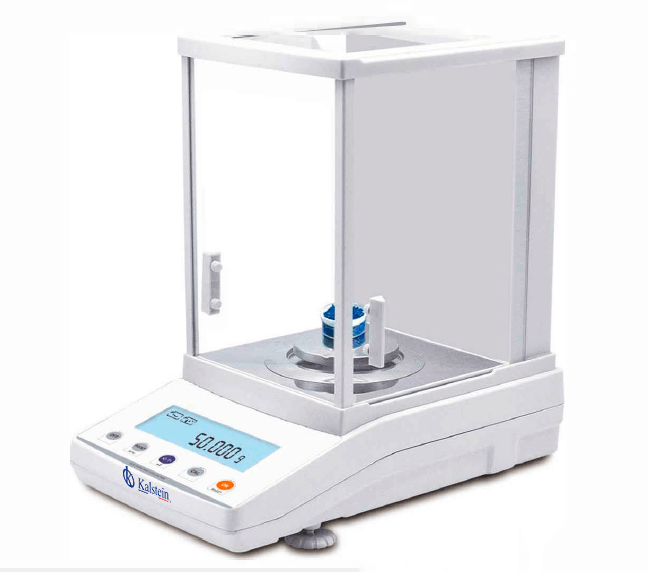
Troubleshooting Common Errors on the YR05772 Analytical Balance
The YR05772 Analytical Balance is a critical tool in various laboratory settings, known for its precision and reliability. However, like any sophisticated instrument, it can encounter issues that may hinder its performance. This guide aims to address common symptoms that users may face, providing practical solutions to ensure optimal operation.
Technical Specifications of the YR05772
| Specification | Details |
|---|---|
| Model | YR05772 |
| Capacity | 600g |
| Readability | 0.001g |
| Minimum Weighing | 0.004g |
| Repeatability | ±0.002g |
| Linearity | ±0.003g |
| Stabilization Time | ≤3S |
| Dimensions | 340x215x350mm |
| Weight | 10kg |
Common Symptoms and Troubleshooting Steps
Identifying the symptoms displayed by the YR05772 Analytical Balance is crucial for proper troubleshooting. Below are sections dedicated to specific issues, their probable causes, and solutions.
1. Equipment Does Not Power On
If the YR05772 does not power on, it can cause significant delays in your workflow. Possible causes include:
- Power Supply Issue: Check if the power cord is properly connected and functional.
- Faulty Power Button: Ensure the power button is functioning correctly.
- Internal Fuse Failure: Check and replace the internal fuse if necessary.
To troubleshoot, follow these steps:
- Inspect the power cord for damage.
- Test the outlet with another device.
- Check the power button for any resistance or damage.
2. Error Code E-03
Error code E-03 may indicate issues with the internal calibration of the balance. This can happen due to:
- Environmental Interference: Excessive vibrations or air currents can affect measurements.
- Calibration Needed: The device may require recalibration.
To resolve this issue, you can:
- Ensure the balance is on a stable and level surface.
- Recalibrate the balance following the manufacturer's instructions.
3. Inconsistent Readings
Inconsistent readings can lead to inaccurate results and affect your overall experimentation. Common causes include:
- Drafts: Ensure that the balance is not exposed to drafts or wind.
- Sample Weight Fluctuation: Ensure that the sample weight is stable when weighing.
- Dirty Surface: A dirty weighing pan can affect the readings.
To correct inconsistent readings:
- Place the balance in a draft-free environment.
- Clean the weighing pan thoroughly.
Symptom-Cause-Solution Matrix for YR05772
| Symptom | Possible Cause | Solution |
|---|---|---|
| Equipment Does Not Power On | Power supply issue, faulty power button, internal fuse failure | Check connections, test power outlet, replace fuse |
| Error Code E-03 | Environmental interference, calibration needed | Reposition balance, recalibrate |
| Inconsistent Readings | Drafts, sample weight fluctuation, dirty surface | Ensure draft-free area, stabilize sample, clean pan |
Frequently Asked Questions
What should I do if my YR05772 shows an overload alarm?
The overload alarm on the YR05772 indicates that the weight on the balance exceeds its capacity. To resolve this, remove excess weight from the pan and reset the balance.
How can I calibrate the YR05772 Analytical Balance?
Calibration can be performed using certified calibration weights. Ensure the balance is at room temperature, and follow the calibration process outlined in the user manual to achieve accurate results.
Why is my YR05772 balance not leveling correctly?
Improper leveling can result from an uneven surface or unstable placement. Adjust the feet of the balance to ensure it is level on a solid, flat surface.
Can environmental conditions affect the performance of the YR05772?
Yes, environmental factors such as temperature, humidity, and vibrations can significantly impact the performance of the YR05772. It is crucial to operate the balance in a controlled environment.
What maintenance is required for the YR05772 Analytical Balance?
Regular maintenance includes cleaning the weighing pan, checking electronic components, and performing periodic calibrations to ensure that the balance operates optimally.
How do I interpret the measurements displayed on the YR05772?
The YR05772 displays measurements in various units (g, mg, ct, oz). Ensure you select the appropriate unit for your measurement needs, and refer to the user manual for detailed interpretation guidelines.
If you are looking for a fusion of innovation and quality, you have come to the right place. At Kalstein, we offer you the luxury of exploring our exclusive catalog of laboratory equipment. We manufacture every device to the highest standards of excellence. Our intuitive and seamless online purchasing channels are designed for your convenience, securing the most competitive prices. Hesitate no longer — we bring science to life, it is time to become part of our community.