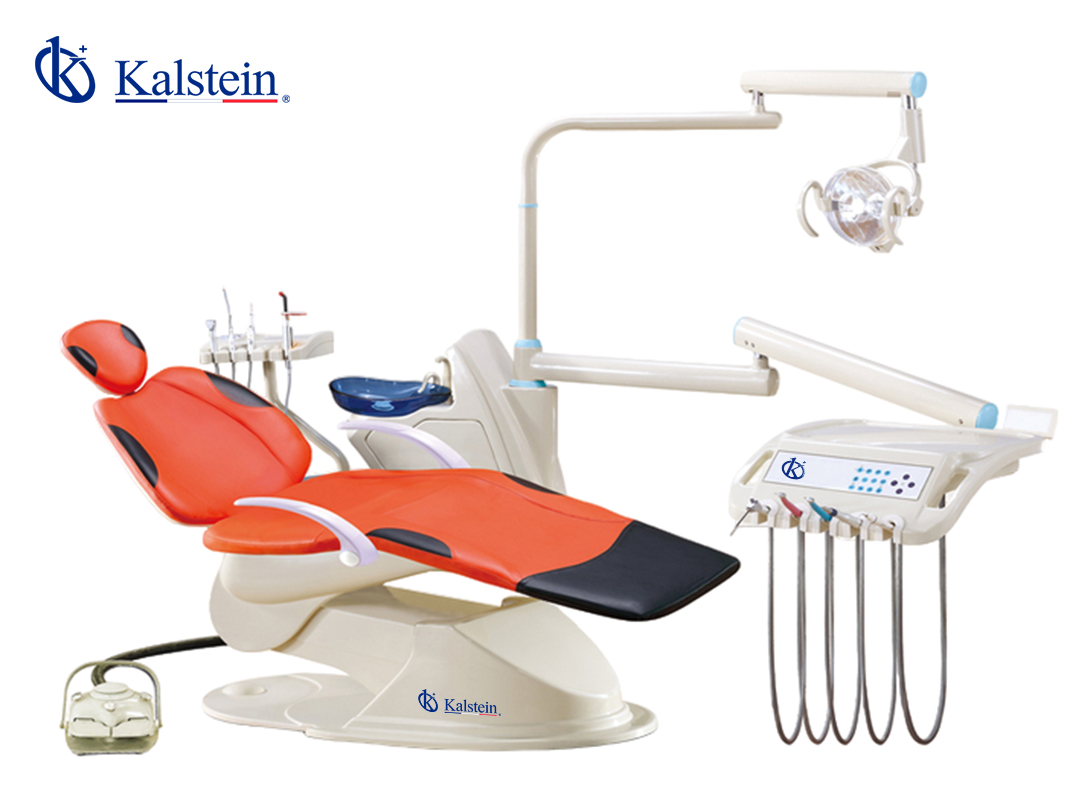
Installation and Startup Guide for the YR06005 Dental Unit
The YR06005 dental unit is designed with ergonomic principles and multifunctional capabilities, making it an essential tool for dental professionals. This guide provides detailed instructions on the installation and startup process, allowing users to ensure their unit operates efficiently from the outset.
Unpacking and Initial Setup
Upon receiving the YR06005 dental unit, it’s crucial to handle the unboxing with care. Here’s a checklist for the initial setup:
- Inspect the packaging for any damage before opening.
- Gather all included accessories: stool, multifunction foot control, dental assistance unit, and other standard components.
- Verify that all items are present based on the provided inventory list.
Installation Requirements
Before proceeding with assembly, ensure your installation site meets the following requirements:
| Requirement | Specification |
|---|---|
| Power Supply | 100/110/120/220/230V, 50/60Hz |
| Air Pressure | 550-800 Kpa |
| Water Pressure | 200-400 Kpa |
| Dimensions | 140 x 97 x 110 cm |
Anchoring and Leveling the Unit
Proper anchoring and leveling are essential for stability and safety. Follow these steps:
- Position the unit in your desired location.
- Use a leveling tool to ensure the base is even.
- Secure the dental unit to the floor using appropriate anchors, if required.
Connecting the Water and Air Supplies
To ensure optimal function, connect the water and air supplies as follows:
- Identify the water inlet and air inlet on the unit.
- Attach the corresponding hoses securely, ensuring no leaks.
- Perform a water pressure test to confirm the connections.
Power-Up Sequence
Once the unit is secured and connected, perform the power-up sequence:
- Connect the unit to the power supply.
- Turn on the main power switch.
- Observe the indicators on the control panel to ensure all systems are functional.
First-Run Calibration
After powering up, calibrate the unit as follows:
- Access the calibration settings via the touchscreen panel.
- Follow the prompts to adjust settings for suction power, water temperature, and light positioning.
Common Setup Mistakes to Avoid
To ensure a smooth installation, keep these common mistakes in mind:
- Failing to check for leaks after connecting hoses.
- Neglecting to properly level the unit.
- Overlooking the calibration steps, which can lead to inconsistent performance.
Technical Specifications of the YR06005 Dental Unit
| Model | YR06005 (Current) |
|---|---|
| Voltage | 100/110/120/220/230V, 50/60Hz |
| Air Pressure | 550-800 Kpa |
| Water Pressure | 200-400 Kpa |
| Net Weight | 170 Kg |
| Gross Weight | 200 Kg |
Frequently Asked Questions
What are the steps for unboxing the YR06005 dental unit?
Upon receiving the YR06005 dental unit, ensure to inspect the packaging for any damage. Carefully open the unit and check that all components listed in the inventory are included.
How do I connect the water and air supplies to the YR06005?
The water and air supplies can be connected by attaching the appropriate hoses to the respective inlets on the dental unit, ensuring each connection is secure to prevent leaks.
What should I do if the unit does not power on?
Check if the unit is properly connected to the power supply and ensure that the main power switch is turned on. If it still does not power on, consult the troubleshooting guide provided in the manual.
How can I ensure proper calibration of the YR06005 unit?
Calibration can be done via the touchscreen panel by following the prompts to adjust settings for suction power and other functions to the desired specifications.
What common mistakes should I avoid during setup?
Common mistakes include failing to check for leaks, neglecting to properly level the unit, and skipping the calibration process, which can cause performance issues.
What are the power requirements for the YR06005 dental unit?
The YR06005 dental unit requires a voltage range of 100/110/120/220/230V and operates at a frequency of 50/60Hz.
Where can I find replacement parts for the YR06005?
Replacement parts for the YR06005 can be ordered through certified suppliers. Refer to the manufacturer's documentation for specific part numbers and availability.
If you are looking for a fusion of innovation and quality, you have come to the right place. At Kalstein, we offer you the luxury of exploring our exclusive catalog of laboratory equipment. We manufacture every device to the highest standards of excellence. Our intuitive and seamless online purchasing channels are designed for your convenience, securing the most competitive prices. Hesitate no longer — we bring science to life, it is time to become part of our community.