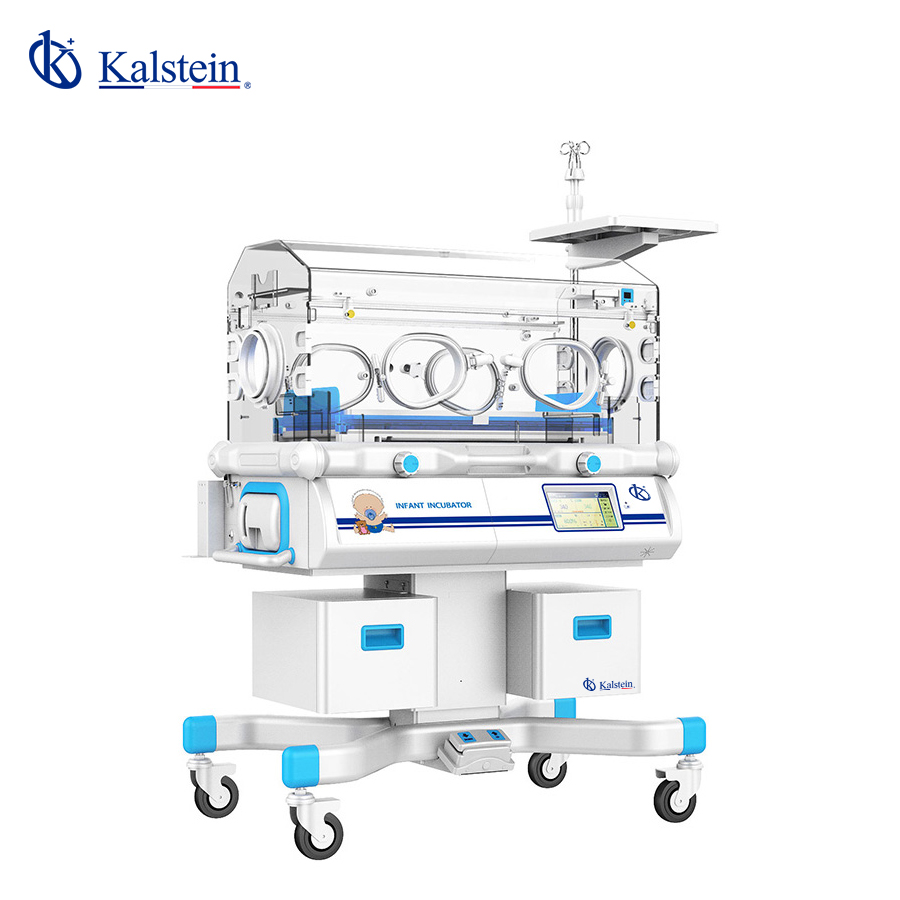
Interpretacja wyników i odczytywanie pomiarów za pomocą inkubatora dla niemowląt YR06213
Inkubator dla niemowląt YR06213 to niezbędne urządzenie medyczne zaprojektowane w celu zapewnienia optymalnego środowiska termicznego dla noworodków. W warunkach klinicznych dokładna interpretacja wyników i pomiarów jest kluczowa dla zapewnienia dobrostanu niemowląt. Artykuł ten zagłębia się w różne aspekty interpretacji wyników i skutecznego odczytywania pomiarów z YR06213, koncentrując się na jego funkcjonalności i sposobach maksymalizacji jego użyteczności.
Przegląd inkubatora dla niemowląt YR06213
YR06213 jest wyposażony w zaawansowane funkcje, takie jak 7-calowy panel sterowania dotykowego LCD, komputerowo sterowana regulacja temperatury serwo dla powietrza i skóry, różnorodne alarmy oraz regulowany kąt nachylenia materaca. Umożliwia precyzyjną kontrolę temperatury i wilgotności, które są kluczowymi parametrami w opiece nad noworodkami.
Specyfikacje techniczne YR06213
| Specyfikacja | Szczegóły |
|---|---|
| Model | YR06213 |
| Wymagania elektryczne | ~220V 50Hz |
| Moc grzewcza | 550VA |
| Zakres temperatury w trybie powietrza | 25.0°C-37.0°C |
| Zakres temperatury w trybie skóry | 34.0°C-37.0°C |
| Zakres kontroli wilgotności | 30-90% RH |
| Zakres wyświetlania wilgotności | 0-99.9% RH |
Zrozumienie pomiarów temperatury
YR06213 umożliwia pomiar zarówno temperatury powietrza, jak i skóry, co jest niezbędne do monitorowania środowiska termicznego niemowlęcia. Temperatura powietrza może być regulowana w zakresie od 25.0°C do 37.0°C, podczas gdy zakres temperatury skóry ustawia się między 34.0°C a 37.0°C.
Podczas odczytywania wyświetlacza kluczowe jest zrozumienie, że idealna temperatura skóry dla noworodków wynosi zazwyczaj od 36.5°C do 37.5°C. Należy regularnie sprawdzać, czy inkubator utrzymuje temperaturę w tych zakresach. Inkubator emituje alarm, gdy temperatura powietrza przekracza 38.0°C lub gdy temperatura skóry wzrasta powyżej wyznaczonego limitu.
Interpretacja poziomów wilgotności
Kontrola wilgotności w YR06213 jest kluczowa dla zapobiegania odwodnieniu noworodków. Działa w zakresie od 30% do 90% RH, a odczyty wyświetlane są w zakresie od 0% do 99.9% RH. Optymalne poziomy wilgotności powinny być utrzymywane na minimum 60% dla noworodków, aby wspierać funkcję bariery skórnej.
Aby dokładnie interpretować odczyty wilgotności, ważne jest regularne kalibrowanie czujnika wilgotności inkubatora i zapewnienie, że poziomy wilgotności mieszczą się w pożądanym zakresie dla kompleksowej opieki. Jeśli odczyty wykraczają poza ustalone parametry, należy podjąć działania korygujące, takie jak dostosowanie zbiornika na wodę lub sprawdzenie przecieków.
Typowe błędne interpretacje i błędy
Interpretacja wyników z YR06213 może czasami prowadzić do błędów. Typowe błędne interpretacje obejmują mylenie odczytów temperatury powietrza z odczytami temperatury skóry. Ważne jest również, aby zauważyć, że nagłe wahania temperatury lub wilgotności mogą wskazywać na ukryte problemy, takie jak awaria inkubatora lub niewłaściwe ustawienia.
Użytkownicy muszą zapoznać się z panelem sterowania i systemami alarmowymi. Regularne szkolenie w zakresie interpretacji wyników jest również zalecane, aby zminimalizować błędy w warunkach klinicznych.
Typowe objawy i rozwiązywanie problemów
| Objaw | Prawdopodobna przyczyna | Rozwiązanie |
|---|---|---|
| Sprzęt nie włącza się | Problem z zasilaniem | Sprawdź połączenia elektryczne i upewnij się, że napięcie jest prawidłowe |
| Kod błędu E-03 | Awarie czujnika temperatury | Sprawdź i wymień czujnik temperatury w razie potrzeby |
| Niekonsekwentne odczyty temperatury | Wymagana kalibracja | Skalibruj inkubator ponownie zgodnie z instrukcją obsługi |
Najczęściej zadawane pytania
Jakie są idealne ustawienia temperatury i wilgotności dla YR06213?
Idealna temperatura dla skóry powinna być utrzymywana w zakresie od 36.5°C do 37.5°C, podczas gdy poziomy wilgotności powinny wynosić co najmniej 60% RH, aby zapewnić optymalne warunki środowiskowe dla noworodków.
Jak często powinienem kalibrować YR06213?
Kalibracja YR06213 powinna być przeprowadzana regularnie, najlepiej co miesiąc lub po znaczących zmianach warunków środowiskowych, aby zapewnić dokładne odczyty temperatury i wilgotności.
Co powinienem zrobić, jeśli poziom wilgotności jest zbyt niski?
Jeśli poziomy wilgotności są zbyt niskie, sprawdź zbiornik na wodę pod kątem odpowiedniego zaopatrzenia i upewnij się, że nie ma przeszkód w systemie kontroli wilgotności. Dostosuj ustawienia w razie potrzeby, aby przywrócić optymalne poziomy wilgotności.
Jak mogę rozwiązać kody błędów wyświetlane na YR06213?
Odwołaj się do instrukcji obsługi, aby uzyskać szczegółowe kody błędów i odpowiadające im kroki rozwiązywania problemów. Powszechne problemy często dotyczą awarii czujników lub problemów z zasilaniem.
Czy YR06213 może być używany w różnych ustawieniach klinicznych?
Tak, YR06213 jest wszechstronny i może być dostosowany do użycia w różnych środowiskach klinicznych, takich jak oddziały intensywnej terapii noworodków, szpitale i opieka domowa.
Jakie są opcjonalne akcesoria do YR06213?
Opcjonalne akcesoria obejmują funkcję ważenia elektrycznego i elektryczny podnośnik, które zwiększają funkcjonalność inkubatora i wspomagają opiekę nad pacjentem.
Jak działa system alarmowy YR06213?
YR06213 posiada kilka systemów alarmowych, które aktywują się, gdy poziomy temperatury lub wilgotności odbiegają od ustawionych parametrów, co pozwala na natychmiastową interwencję w celu zapewnienia bezpieczeństwa niemowlęcia.
Jeśli szukasz połączenia innowacji i jakości, trafiłeś we właściwe miejsce. W Kalstein oferujemy Ci luksus odkrywania naszego ekskluzywnego katalogu sprzętu laboratoryjnego. Każde urządzenie produkujemy zgodnie z najwyższymi standardami doskonałości. Nasze intuicyjne i bezproblemowe kanały zakupu online są zaprojektowane z myślą o Twojej wygodzie, zapewniając najbardziej konkurencyjne ceny. Nie wahaj się dłużej — ożywiamy naukę, czas stać się częścią naszej społeczności.